Showing posts with label tracing. Show all posts

Sunday, April 7, 2013


This is script is coded by my friend Un_non antilog!
it is really use full  for begineers in hacking /pentesting/linux/backtrack
it has  some awesome tools which are commnly used in network scanning , website hacking , ftp hacking etc
u can run it in liunx/backtrack
if u dont have one download it its available and install it in Vmware and then use!

Download this script

Saturday, April 14, 2012

Guyzz this is nt my tut but i wud like to share it coz its very important frall of us!!
Okay, let's begin!


1) How hackers get caught.

- First stuff that gives you away are "LOGS".
You need to know how events, application, and system logs work. If you dont, you can be easily caught!
The shell history will expose your actions.
Another giveaway is leaving a �:wq� in /var/log/messages or binarys.

- Your laziness will take you into problems.
NEVER HACK FROM HOME! Take your time, and go to net cafe or anywhere else apart from home. Logs will take you down!

- The code that you run on system will take you down. If you compile the code on target, libraries will give you away!

- If your victm, notice, that he is maybe hacked, or something is wrong.. He will ask from his ISP for IP logs, and if you dont use VPN, or if you hack from home, they will hunt you down.

- Thing, that takes you down 100% is BRAGGING. It is common problem of beginning hackers. They like to brag, to earn respect and reputation but NOT KNOWING that is the matter of minutes, hours mby days when they will be caught.
*Don't use hotmail. CIA Owns it.


2) Hiding and Securing you as "Hacker"

- Temporary guest accounts, unrestricted proxy servers, buggy Wingate servers, and anonymous accounts can keep hackers carefree.

*A young hacker is less likely to know all the little things that an expert hacker might know. Besides, the young hacker may be trying to impress others - and get a little careless about covering his tracks. This is why younger hackers are often caught.
*An older hacker, on the other hand, will rarely leave any tracks. They know how to use their slave's computers as a tool for a launching place to get into another computer.

There will always be hackers, and there will always be hackers in prison.

* DESTROY LOGS, REMOVE ALL YOUR TRACKS!

* DO NOT HACK AT HOME! USE VPN THAT SAVES NO LOGS!

HOW TO REMOVE YOUR SYSTEM LOGS:

Choose Start > Control Panel.
Double-click Administrative Tools, and then double-click Event Viewer.
In either pane of the Event Viewer window, right-click System and then select Clear All Events.
To save the current system log, click Yes when Windows returns the message, "Do you want to save 'System' before clearing it?", enter a file name for the saved system log file, and then click Save.


[size=xx-large]Virtual Private Network - VPN(Click on spoilers)[/size]
1) 
I will recommend you to use proXPN.
It is VPN that do not store logs.
proXPN: http://proxpn.com/download.php


ProXPN Windows installation:

(I used images from proXPN official website)


Click "Next"


Just click "Agree" here to continue installation.


Let the installer run until completion.


Just click the "Finish" button to complete the installation.


Welcome to the proXPN client. Click the "Don't have an account?" link to create a new account.


Enter your email address and the password of your choice. Then check the license agreement checkbox and click the "I agree - create account" button.


Click "OK" to finish the account signup process in the software client. 


Check your email for a greeting email from proXPN. In that email is a link which you will need to click in order to activate your free account. If it doesn't show up within a reasonable timeframe, make sure to check your spam folders. Once you've clicked the link in the email, your account should be active. Go ahead and click the "connect" button to connect to proXPN


Once you connect, the system tray icon will turn green. You're now surfing safe and secure, courtesy of proXPN.

And you are done with securing yourself.
Just to make sure, go check if you are truly anonimous 
http://www.ip-adress.com/Proxy_Checker/

READ THIS PLEASE: Before you start flaming and attacking me, i would like to tell you that i haven't searched for threads like this, and i know that maybe there are 1000 similar threads about this, but i wanted to make stuff simple and i will maybe help someone who reads this thread. So PLEASE, if you don't like this, don't comment at all. If you like this, say "Thanks this is good tutorial" etc.. And i would be happy. Thank you for listening me. MS 4 Life!

Wednesday, March 14, 2012


Anonymous-OS 0.1 : Anonymous Hackers released their own Operating System 
Anonymous-OS+0.1

Yes! Its true,  Anonymous Hackers released their own Operating System with name "Anonymous-OS", is Live is an ubuntu-based distribution and created under Ubuntu 11.10 and uses Mate desktop. You can create the LiveUSB with Unetbootin.

Pre-installed apps on Anonymous-OS:
- ParolaPass Password Generator
- Find Host IP
- Anonymous HOIC
- Ddosim
- Pyloris
- Slowloris
- TorsHammer
- Sqlmap
- Havij
- Sql Poison
- Admin Finder
- John the Ripper
- Hash Identifier
- Tor
- XChat IRC
- Pidgin
- Vidalia
- Polipo
- JonDo
- i2p
- Wireshark
- Zenmap
�and more

Download Anonymous-OS 0.1Warning : It is not developed by any Genuine Source, can be backdoored OS by any Law enforcement Company or Hacker. You at your own Risk.

Sunday, August 14, 2011

Cain & Abel v4.9.4 | Tool For cracking passwords


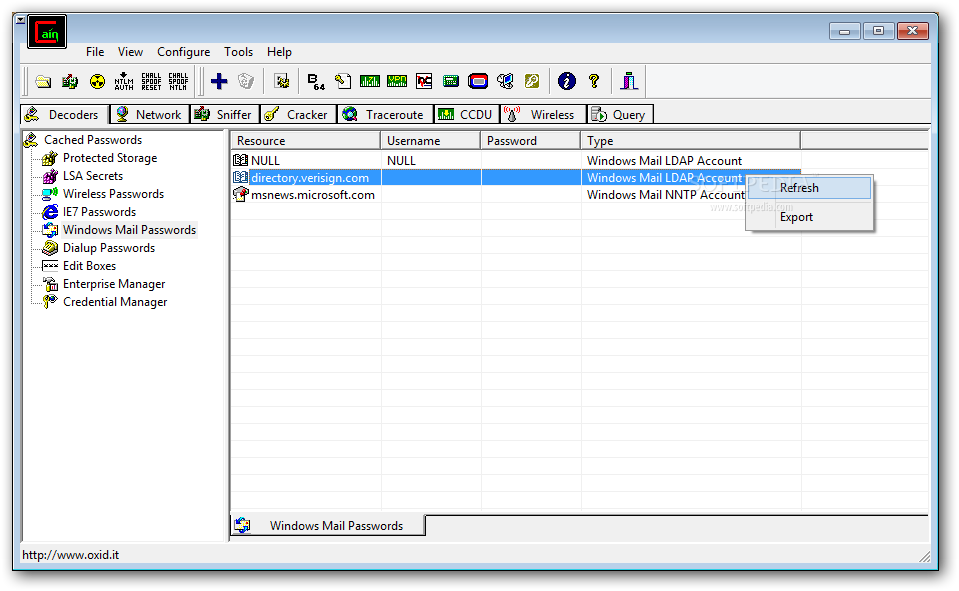
Cain & Abel is a password recovery tool for Microsoft Operating systems. It allows easy recovery od various kind od passwords by sniffing the network, cracking encrypted passwords using Dictionary, Brute-Force and Cryptanalysis attacks, recoding VoIP coversations, decoding srambled passwords, recovering wireless network keys, revealing password boxes, uncovering cached passwords and analyzing routing protocols.

Cain & Abel screenshot 1 - The Decoders tab allows you to decrypt protected documents, dialup passwords, wireless passwords

This is the Change Log:
  • Added support for MSCACHEv2 Hashes (used by Vista/Seven/2008) in Dictionary and Brute-Force Attacks.

  • Added MSCACHE v2 RainbowTables to WinRTGen v2.6.3

  • Added MSCACHE v2 Hashes Cryptanalysis via Sorted Rainbow Tables.

  • MS-CACHE Hashes Dumper now supports MSCACHEv2 hashes extraction from Windows Vista/Seven/2008 machines and offline registry files.

Download Cain & Abel v4.9.41 from here: Download

Sunday, July 24, 2011

Online face reading tool


Face scanner tool enable you  to scan any face and within seconds get a character analysis revealing the person's best or worst traits, Just like it's done by profilers in intelligence agencies! Are your friends/date partners really who you think they are? Now you can be the judge.
this application can read any feature and line on a face to develop an accurate profile of its owner. Each face reflects in its structures and lines its owner's mental attitudes, intimacy needs, ethics, emotional style and verbal communication. Almost anything you want to know about yourself or another person is literally as plain as the nose on your face or theirs
Face reading gives you the facts you need to make important decisions, and sharpens your perceptions enabling you to develop a deeper understanding of every person you will ever interact with.


Sunday, July 17, 2011


Overview

OWASP Mantra Security Framework.jpg

  • Mantra is a collection of free and open source tools integrated into a web browser, which can become handy for students, penetration testers, web application developers,security professionals etc. It is portable, ready-to-run, compact and follows the true spirit of free and open source software.
  • Mantra is lite, flexible, portable and user friendly with a nice graphical user interface. You can carry it in memory cards, flash drives, CD/DVDs, etc. It can be run natively on Linux, Windows and Mac platforms. It can also be installed on to your system within minutes. Mantra is absolutely free of cost and takes no time for you to set up.

Project Goals

  1. Create an ecosystem for hackers based on browser
  2. To bring the attention of security people to the potential of a browser based security platform
  3. Provide easy to use and portable platform for demonstrating common web based attacks( read training )
  4. To associate with other security tools/products to make a better environment. Eg:
    1. It can be a nice addition to security distribution OSs like OWASP Live CD
    2. It can be used to solve basic levels of CTF contests
    3. It can associate with projects like DVWA to showcase attacks
    4. It can bring functions like crawler, SQL injection scanner etc by installing extensions.


     Download here :  
For windows  Here

For linux 32bit  Here

Thursday, July 14, 2011


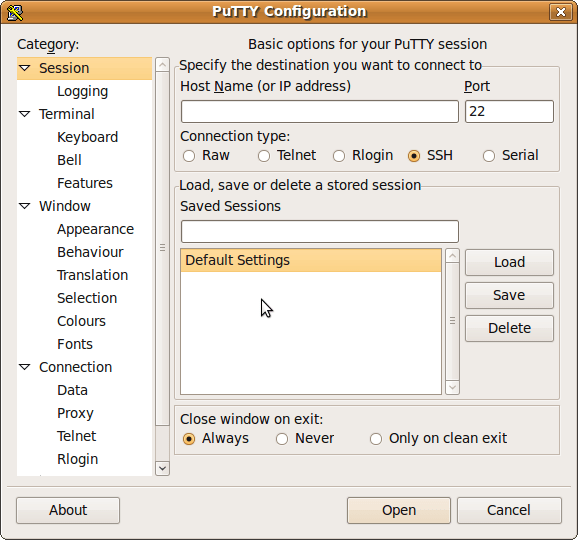
PuTTY 0.61 is out, after over four years , with new features, bug fixes, and compatibility updates for Windows 7 and various SSH server software.

                                                         
PuTTY is a free implementation of Telnet and SSH for Windows and Unix platforms, along with an xterm terminal emulator

These features are new in beta 0.61:
Kerberos/GSSAPI authentication in SSH-2.
Local X11 authorisation support on Windows. (Unix already had it, of course.)
Support for non-fixed-width fonts on Windows.
GTK 2 support on Unix.
Specifying the logical host name independently of the physical network address to connect to.
Crypto and flow control optimisations.
Support for the zlib@openssh.com SSH-2 compression method.
Support for new Windows 7 UI features: Aero resizing and jump lists.
Support for OpenSSH AES-encrypted private key files in PuTTYgen.
Bug fix: handles OpenSSH private keys with primes in either order.
Bug fix: corruption of port forwarding is fixed (we think).
Bug fix: various crashes and hangs when exiting on failure,
Bug fix: hang in the serial back end on Windows.
Bug fix: Windows clipboard is now read asynchronously, in case of deadlock due to the clipboard owner being at the far end of the same PuTTY's network connection (either via X forwarding or via tunnelled rdesktop).

                         Download: HERE

Friday, July 8, 2011

                              
I have foud many people who ask that how to scan a website for a vulnerability ? how to make a perfect footprinting for an attack to get completed ?
so guyzz here is your solution we have a tool which can scan each and every website out there. this tool is known as Acunetix .
Basically it is developed for the website owners to find the vulnerability in there websites. but hackers can use it to scan loop holes nd vulnerable spots in a website so i have uploaded this awesome tool for you, this tool is also very good for cyber security.


Audit your website security with Acunetix Web Security Scanner

Website security is possibly today's most overlooked aspect of securing the enterprise and should be a priority in any organization. Hackers are concentrating their efforts on web-based applications - shopping carts, forms, login pages, dynamic content, etc. Web applications are accessible 24 hours a day, 7 days a week and control valuable data since they often have direct access to backend data such as customer databases. 

Firewalls, SSL and locked-down servers are futile against web application hacking

Any defense at network security level will provide no protection against web application attacks since they are launched on port 80 - which has to remain open. In addition, web applications are often tailor-made therefore tested less than off-the-shelf software and are more likely to have undiscovered vulnerabilities. Acunetix WVS automatically checks your web applications for SQL Injection, XSS & other web vulnerabilities.  


                                       DOWNLOAD HERE
                      

Tuesday, June 7, 2011


As, i have discussed previously how to get any ones ip from chat/Im..etc today m gonna tell u how to get some ones ip from gmail,yahoo,hotmail,,outlook,AOL.
When you receive an email, you receive more than just the message. The email comes with headers that carry important information that can tell where the email was sent from and possibly who sent it. For that, you would need to find the IP address of the sender. The tutorial below can help you find the IP address of the sender.
Also, note that if you receive an email sent from a Gmail account through the web browser, you may not be able to find the real IP address because Google hides the real IP address of the sender. However, if someone sends you a mail from his/her Gmail account using a client like Thunderbird, Outlook or Apple Mail, you can find the originating IP address.
Lets begin this. First of all, the IP address is generally found in the headers enclosed beween square brackets, for instance[123.56.78.9]


Finding IP address in Gmail


  1. Log into your Gmail account with your username and password.
  2. Open the mail.
  3. To display the email headers,
    • Click on the inverted triangle beside Reply. Select Show Orginal.
  4. Look for Received: from followed by the IP address between square brackets [ ].
    Received: from mx-out.facebook.com (outmail017.snc4.facebook.com [66.220.144.149]
  5. If you find more than one Received: from patterns, select the last one.
  6. Track the IP address of the sender


Finding IP address in Yahoo! Mail

  1. Log into your Yahoo! mail with your username and password.
  2. Click on Inbox or whichever folder you have stored your mail.
  3. Click on the Subject of the email you want to track and right-click.
  4. Look for Received: from followed by the IP address between square brackets [ ].
    That should most likely be the IP address of the sender.
    If there are many instances of 
    Received: from with the IP address, select the IP address in thelast pattern. If there are no instances of Received: from with the IP address, select the first IP address in X-Originating-IP.
  5. Track the IP address of the sender


Finding IP address in Hotmail

Hotmail has been integrated with Windows Live, or vice-versa. And the format has changed. Here is how you find the IP address of the sender.
  1. Log into your Hotmail/Windows Live account with your username and password.
  2. Click on the Inbox link on the left.
  3. Under the column that says "Sort by", find the email that you want to track and right-click on it. You should get a menu that has something like Mark as read, Mark as unread, and so on. The last option in the menu should be View message source. Select it.
  4. You should see the email headers now
  5. If you find a header with X-Originating-IP: followed by an IP address, that is the sender's IP address
  6. If that doesn't work, look for Received: from followed by IP address within square brackets[].
  7. * If you have multiple Received: from headers, eliminate the ones that have proxy.anyknownserver.com.
  8. Track the IP address of the sender

Finding IP address in AOL

  1. Log into your AOL Mail AIM account with your username and password.
  2. Open the email that you want to track.
  3. On the top row, click on Action and in the drop-down menu, select View Message Source
  4. It opens a new page with the headers. Once you have the headers, look for the IP address that follows X-AOL-IP:. That should be the IP address of the sender.
  5. Track that IP address of the sender

NOTE: if the mail sender uses proxy or hides its original ip then u wont find this helpful as the ip adress will be fake nd the location will also be fake.
thanxx for reading the article comment if got any problem..:D..!!

Saturday, April 30, 2011

Free location tracking codes will trace location of your chat buddy with the help of  IP lookup. 


These Location tracking codes, which you present in chat room
land on page with good pictures. meanwhile, the other chat buddy's IP Address is stored in a database. IP Look Up identify
Country, Near city, Local time, etc..  of the other buddy.

 Get Your  chat Tracking codes.
 After Sign Up, you get a set of tracking codes,
Using which you can find Location details.. of  your chat friends.

How to Sign Up


The process of sign up involves entering
1. First name2. Last name3. User name4. Pass word
Sign Up takes less than 20 Seconds to complete.
 Log In to your member page, where you find, your own personalized "Location tracking codes" ready to use in any chat rooms.
Member page has mainly two pages
1. Several Tracking Codes (page)
2. Track results (page)

How to Find Location of your chat friend
Very first step is Sign Up. and Log in your member area.
Copy any one tracking code
Past that code in chat room text box
Ask your chat friend  to click and see the picture.
After few seconds click Track Result link and find chat friend's location details.
Sign Up NOW
NOW U GOT THE IP ADRESS IF U WONT FIND ANY MAP OR LOACATION THEN COPY THE IP ADRESS ND GOTO: www.ip-adress.com  
nd paste ur ip ther nd search u will find location too..:D:D:D:D..!!!

Thursday, April 21, 2011

TRACE IP ADDRESS ,MOBILE NUMBERS...ETC ETC..!!


Many people want this type of services and searched over internet a waste their time but unable to get desired results.
A few days ago i got a website which have a lots of tracing services. It shows tracing results in a map along with all suitable information you want to know.
You can trace a Mobile number. For example , when we enter the 10 digit mobile number, then we get the Mobile Service provider, Location, City along with area in a map. 
Thats really awesome.


You can also trace IP Address of a person. Enter your IP address and it will show you the location of this IP address and complete details of the ISP with the contact number of that IP Address. 


Features of this site is

Trace Mobile Number
Trace Vehical Number
Trace Pin Code
Trace IP Address
WHOIS Trace 


GO TO THIS LINK:
http://www.indiatrace.com 


please comment below if this post is useful for you..
:)